
Welcome to the ninth article in the series on developing KDAMonitor!
In this article, I’ll cover version v0.9 of the project. In this version, I implement the project’s fourth sensor: the registry activity sensor.
Here are the files involved in this article, and the section that explains each one:
| File | Role | Section |
|---|---|---|
event_types.h | New KDAMON_REGISTRY_EVENT_DATA type + KDAMON_REGISTRY_ACTION enum + union in KDAMON_EVENT | What to capture on a registry event? |
kdamon_config.h | Configuration constants for the registry sensor | What to capture on a registry event? |
registry_callback.h | Register/unregister declaration | Implementing the callback |
registry_callback.c | The callback itself | Implementing the callback |
log_writer.c | JSONL serialization specific to registry events | Serializing registry events to JSONL |
driver_entry.c | Registering/unregistering the callback on load/unload | Integration into driver_entry.c |
The project can be found in this repository: KDAMonitor.
What to capture on a registry event?#
As with every article covering a sensor, we start by listing what our event needs to contain. Here’s what was chosen:
the ID of the process interacting with the registry (
HANDLE ProcessId)the path to the process interacting with the registry (
WCHAR ProcessPath[KDAMON_REG_PATH_MAX];)the action performed (
KDAMON_REGISTRY_ACTION Action), i.e. what the process did:- set (created or modified) a value in a registry key
- deleted a value from a registry key
- created or opened a registry key
The action performed is represented by an enum:
typedef enum _KDAMON_REGISTRY_ACTION
{
    KDAMON_REGISTRY_ACTION_SET_VALUE,
    KDAMON_REGISTRY_ACTION_DELETE_VALUE,
    KDAMON_REGISTRY_ACTION_CREATE_KEY,
} KDAMON_REGISTRY_ACTION;- the path of the key involved (
WCHAR KeyPath[KDAMON_REG_PATH_MAX];) - the name of the value involved (
WCHAR ValueName[KDAMON_REG_VALUENAME_MAX];) - the type of the value (
ULONG ValueType;) - the content of the value (
UCHAR ValueData[KDAMON_REG_VALUEDATA_MAX];) - the size of the value’s content (
ULONG ValueDataSize;) - the status of the operation (
NTSTATUS Status;), only filled in for key creation
Implementing the callback#
All the code shown in this section is in the registry_callback.c file. Unlike the previous sensors, we don’t register one routine per event type. Instead, we use CmRegisterCallbackEx, which registers a single routine that receives every registry operation. We then need to decide which operation(s) we want to react to.
Two functions are exposed in the header:
NTSTATUS KdaMonRegistryCallbackRegister(_In_ PDRIVER_OBJECT DriverObject);: registers the callback. It additionally takes theDriverObject, required byCmRegisterCallbackExVOID KdaMonRegistryCallbackUnregister(VOID);: unregisters the callback
Everything else is private:
KdaMonRegistryCallback: the registered routine, which acts as the dispatcherKdaMonRegistryHandleSetValueKey,KdaMonRegistryHandleDeleteValueKey,KdaMonRegistryHandlePostCreateKeyEx: one handler per actionKdaMonRegistryResolveKeyPath,KdaMonRegistryResolveProcessPath: two helpers that resolve paths
See the Microsoft documentation for EX_CALLBACK_FUNCTION and CmRegisterCallbackEx.
Registering and unregistering the callback#
LARGE_INTEGER g_RegistryCookie = { 0 };

...

NTSTATUS KdaMonRegistryCallbackRegister(_In_ PDRIVER_OBJECT DriverObject)
{
    NTSTATUS status;
    UNICODE_STRING altitude;

    RtlInitUnicodeString(&altitude, KDAMON_REG_ALTITUDE);

    status = CmRegisterCallbackEx(
        KdaMonRegistryCallback,
        &altitude,
        DriverObject,
        NULL,
        &g_RegistryCookie,
        NULL
    );
    if (!NT_SUCCESS(status))
    {
        KdPrint((DRIVER_TAG " [ERROR]: CmRegisterCallbackEx failed: 0x%X\n", status));
        return status;
    }

    KdPrint((DRIVER_TAG " [SUCCESS]: Registry callback registered\n"));
    return STATUS_SUCCESS;
}KdaMonRegistryCallback: the routine called on every registry operationaltitude: a string defining the callback’s position in the chain of registry filters (KDAMON_REG_ALTITUDE,360000)&g_RegistryCookie: an identifier returned by the kernel for this registration
The cookie is global because it’s used in two places: unregistration, and key path resolution (see below).
VOID KdaMonRegistryCallbackUnregister(VOID)
{
    if (g_RegistryCookie.QuadPart != 0)
    {
        CmUnRegisterCallback(g_RegistryCookie);
        g_RegistryCookie.QuadPart = 0;
        KdPrint((DRIVER_TAG " [SUCCESS]: Registry callback unregistered\n"));
    }
}
The check on QuadPart prevents unregistering a callback that was never registered.
The dispatcher#
static NTSTATUS KdaMonRegistryCallback(_In_ PVOID CallbackContext, _In_opt_ PVOID Argument1, _In_opt_ PVOID Argument2)
{
    UNREFERENCED_PARAMETER(CallbackContext);

    REG_NOTIFY_CLASS notifyClass = (REG_NOTIFY_CLASS)(ULONG_PTR)Argument1;

    switch (notifyClass)
    {
    case RegNtPreSetValueKey:
        KdaMonRegistryHandleSetValueKey((PREG_SET_VALUE_KEY_INFORMATION)Argument2);
        break;

    case RegNtPreDeleteValueKey:
        KdaMonRegistryHandleDeleteValueKey((PREG_DELETE_VALUE_KEY_INFORMATION)Argument2);
        break;

    case RegNtPostCreateKeyEx:
        KdaMonRegistryHandlePostCreateKeyEx((PREG_POST_OPERATION_INFORMATION)Argument2);
        break;

    default:
        break;
    }

    return STATUS_SUCCESS;
}
Argument1 contains the class of the operation (REG_NOTIFY_CLASS). Argument2 points to a structure whose type depends on that class, hence the cast in each case. The three classes handled are:
| Class | Structure | Timing |
|---|---|---|
RegNtPreSetValueKey | REG_SET_VALUE_KEY_INFORMATION | Before the value is written |
RegNtPreDeleteValueKey | REG_DELETE_VALUE_KEY_INFORMATION | Before the value is deleted |
RegNtPostCreateKeyEx | REG_POST_OPERATION_INFORMATION | After the key is created |
The first two are Pre notifications, meaning the callback is invoked before the operation, with information about the value, but without knowing its outcome. The last one is a Post notification: the operation has already completed, which gives access to its Status.
The callback always returns STATUS_SUCCESS. Returning an error from a Pre notification would block the operation.
RegNtPostCreateKeyExis fired for every call toZwCreateKey, which either creates the key or opens an already existing one.
Resolving the key path#
static NTSTATUS KdaMonRegistryResolveKeyPath(_In_ PVOID Object, _Out_writes_bytes_(KeyPathBufferSize) PWCHAR KeyPathBuffer, _In_ ULONG KeyPathBufferSize)
{
    NTSTATUS status;
    PCUNICODE_STRING ObjectName = NULL;

    KeyPathBuffer[0] = L'\0';

    if (Object == NULL)
    {
        return STATUS_INVALID_PARAMETER;
    }

    status = CmCallbackGetKeyObjectIDEx(
        &g_RegistryCookie,
        Object,
        NULL,
        &ObjectName,
        0
    );
    if (!NT_SUCCESS(status) || ObjectName == NULL)
    {
        return status;
    }

    ULONG charsToCopy = min(ObjectName->Length / sizeof(WCHAR), KeyPathBufferSize - 1);
    RtlCopyMemory(KeyPathBuffer, ObjectName->Buffer, charsToCopy * sizeof(WCHAR));
    KeyPathBuffer[charsToCopy] = L'\0';

    CmCallbackReleaseKeyObjectIDEx(ObjectName);

    return STATUS_SUCCESS;
}
The structures we receive contain a pointer to the key object, but not its path. CmCallbackGetKeyObjectIDEx returns this path (in the form \REGISTRY\MACHINE\...) in a system-allocated UNICODE_STRING, which must be released with CmCallbackReleaseKeyObjectIDEx once the copy is done.
The copy uses the same safe-truncation pattern as in previous articles. The buffer is cleared upfront, so if resolution fails, the event ends up with an empty path.
Resolving the process path#
NTKERNELAPI
NTSTATUS SeLocateProcessImageName(_In_ PEPROCESS Process, _Out_ PUNICODE_STRING* pImageFileName);
SeLocateProcessImageName is exported by the kernel but isn’t declared in the WDK headers, so we write the prototype by hand at the top of the file.
static NTSTATUS KdaMonRegistryResolveProcessPath(_Out_writes_z_(Length) PWCHAR Buffer, _In_ ULONG Length)
{
    NTSTATUS status;
    PUNICODE_STRING imageName = NULL;

    Buffer[0] = L'\0';

    status = SeLocateProcessImageName(PsGetCurrentProcess(), &imageName);
    if (!NT_SUCCESS(status) || imageName == NULL)
    {
        return status;
    }

    ULONG charsToCopy = min(imageName->Length / sizeof(WCHAR), Length - 1);
    RtlCopyMemory(Buffer, imageName->Buffer, charsToCopy * sizeof(WCHAR));
    Buffer[charsToCopy] = L'\0';

    ExFreePool(imageName);

    return STATUS_SUCCESS;
}
The callback runs in the context of the thread performing the operation, so PsGetCurrentProcess() is the process touching the registry.
The three handlers#
The three handlers follow the same skeleton:
- create the event and its timestamp
- fill in the PID (
PsGetCurrentProcessId()) and the process path - fill in the action and the key path
- fill in the fields specific to the action
- push the event onto the queue
Here’s KdaMonRegistryHandleSetValueKey in full, as an example:
static VOID KdaMonRegistryHandleSetValueKey(_In_opt_ PREG_SET_VALUE_KEY_INFORMATION Info)
{
    if (Info == NULL || Info->ValueName == NULL)
    {
        return;
    }

    KDAMON_EVENT Event = { 0 };
    Event.Type = KdaMonEventRegistry;
    KeQuerySystemTimePrecise(&Event.Timestamp);

    Event.Data.Registry.ProcessId = PsGetCurrentProcessId();
    KdaMonRegistryResolveProcessPath(
        Event.Data.Registry.ProcessPath,
        RTL_NUMBER_OF(Event.Data.Registry.ProcessPath)
    );

    Event.Data.Registry.Action = KDAMON_REGISTRY_ACTION_SET_VALUE;

    KdaMonRegistryResolveKeyPath(
        Info->Object,
        Event.Data.Registry.KeyPath,
        RTL_NUMBER_OF(Event.Data.Registry.KeyPath)
    );

    ULONG nameChars = min(
        Info->ValueName->Length / sizeof(WCHAR),
        RTL_NUMBER_OF(Event.Data.Registry.ValueName) - 1
    );
    RtlCopyMemory(Event.Data.Registry.ValueName, Info->ValueName->Buffer, nameChars * sizeof(WCHAR));
    Event.Data.Registry.ValueName[nameChars] = L'\0';

    Event.Data.Registry.ValueType = Info->Type;

    ULONG dataSize = min(Info->DataSize, KDAMON_REG_VALUEDATA_MAX);
    if (Info->Data != NULL && dataSize > 0)
    {
        RtlCopyMemory(Event.Data.Registry.ValueData, Info->Data, dataSize);
    }
    Event.Data.Registry.ValueDataSize = dataSize;

    KdaMonEventQueuePush(&Event);
}
The value’s data is truncated to KDAMON_REG_VALUEDATA_MAX bytes, and ValueDataSize holds the copied size.
The other two handlers only differ on step 4:
KdaMonRegistryHandleDeleteValueKey(PREG_DELETE_VALUE_KEY_INFORMATION): only the value name is copied,ValueTypeandValueDataSizeare 0KdaMonRegistryHandlePostCreateKeyEx(PREG_POST_OPERATION_INFORMATION): no value name, and it’s the only handler that captures the operation’s result withEvent.Data.Registry.Status = Info->Status;
The full code for
KdaMonRegistryHandleDeleteValueKeyandKdaMonRegistryHandlePostCreateKeyExcan be found inKDAMonitor/driver/src/registry_callback.c.
Serializing registry events to JSONL#
Here’s the function dedicated to serializing registry events:
static NTSTATUS KdaMonLogWriterWriteRegistryEvent(_In_ const KDAMON_EVENT* Event, _Out_writes_z_(BufferSize) PSTR EventBuffer, _In_ SIZE_T BufferSize)
{
    CHAR EscapedKeyPath[520];
    CHAR EscapedValueName[520];
    CHAR FormattedValueData[600];
    CHAR StatusField[16];

    const char* action;

    if (!KdaMonJsonEscapeW(Event->Data.Registry.KeyPath, EscapedKeyPath, sizeof(EscapedKeyPath)))
    {
        KdPrint((DRIVER_TAG " [WARNING]: KeyPath truncated during JSON escape (event %lu)\n", Event->Id));
    }

    switch (Event->Data.Registry.Action)
    {
    case KDAMON_REGISTRY_ACTION_SET_VALUE:
    {
        action = "set_value";
        break;
    }
    case KDAMON_REGISTRY_ACTION_DELETE_VALUE:
    {
        action = "delete_value";
        break;
    }
    case KDAMON_REGISTRY_ACTION_CREATE_KEY:
    {
        action = "create_key";
        break;
    }
    default:
    {
        action = "unknown";
        break;
    }
    }

    if (Event->Data.Registry.Action == KDAMON_REGISTRY_ACTION_CREATE_KEY)
    {
        RtlStringCbCopyA(EscapedValueName, sizeof(EscapedValueName), "");
        RtlStringCbCopyA(FormattedValueData, sizeof(FormattedValueData), "null");
    }
    else
    {
        if (!KdaMonJsonEscapeW(Event->Data.Registry.ValueName, EscapedValueName, sizeof(EscapedValueName)))
        {
            KdPrint((DRIVER_TAG " [WARNING]: ValueName truncated during JSON escape (event %lu)\n", Event->Id));
        }

        if (Event->Data.Registry.Action == KDAMON_REGISTRY_ACTION_SET_VALUE)
        {
            KdaMonRegistryFormatValueData(&Event->Data.Registry, FormattedValueData, sizeof(FormattedValueData));
        }
        else
        {
            RtlStringCbCopyA(FormattedValueData, sizeof(FormattedValueData), "null");
        }
    }

    if (Event->Data.Registry.Action == KDAMON_REGISTRY_ACTION_CREATE_KEY)
    {
        RtlStringCbPrintfA(StatusField, sizeof(StatusField), "\"0x%08X\"", (ULONG)Event->Data.Registry.Status);
    }
    else
    {
        RtlStringCbCopyA(StatusField, sizeof(StatusField), "null");
    }

    return RtlStringCbPrintfA(
        EventBuffer,
        BufferSize,
        "{\"id\":%lu,\"type\":\"%s\",\"timestamp\":%lld,"
        "\"pid\":%lu,\"action\":\"%s\","
        "\"key_path\":\"%s\",\"value_name\":\"%s\",\"value_data\":%s,"
        "\"status\":%s}\n",
        Event->Id,
        KdaMonEventTypeToString(Event->Type),
        Event->Timestamp.QuadPart,
        (ULONG)(ULONG_PTR)Event->Data.Registry.ProcessId,
        action,
        EscapedKeyPath,
        EscapedValueName,
        FormattedValueData,
        StatusField
    );
}
Here’s a brief walkthrough of the KdaMonLogWriterWriteRegistryEvent function:
- We escape the key path with
KdaMonJsonEscapeW. - We convert the action into a string (
set_value,delete_value, orcreate_key). - We prepare the fields that depend on the action:
create_key: no value name or content (value_dataisnull)set_value: the value name is escaped and its content formatted byKdaMonRegistryFormatValueDatadelete_value: the value name is escaped,value_dataisnull
- The status only makes sense for
create_key(a Post notification); for the other actions it’snull. - We fill the
EventBufferwith the event’s information.
KdaMonRegistryFormatValueData picks the format of the value_data field based on ValueType (this function won’t be detailed here for simplicity, see log_writer.c):
| Type | JSON format |
|---|---|
REG_SZ, REG_EXPAND_SZ | escaped string in quotes |
REG_DWORD, REG_QWORD | decimal number |
everything else (REG_BINARY, REG_MULTI_SZ, …) | hex string in quotes |
Binary content is truncated to KDAMON_REG_VALUEDATA_MAX bytes, same as at capture time.
All that’s left is to call this function in the switch of KdaMonLogWriterWriteEvent:
case KdaMonEventRegistry:
    status = KdaMonLogWriterWriteRegistryEvent(Event, EventBuffer, sizeof(EventBuffer));
    break;
Registry event lines will look like this:
{"id":20,"type":"registry","timestamp":134303322704667968,"pid":4836,"action":"create_key","key_path":"\\REGISTRY\\MACHINE\\SOFTWARE\\KDAMonitorTest","value_name":"","value_data":null,"status":"0x00000000"}
{"id":21,"type":"registry","timestamp":134303322704668353,"pid":4836,"action":"set_value","key_path":"\\REGISTRY\\MACHINE\\SOFTWARE\\KDAMonitorTest","value_name":"StringValue","value_data":"hello","status":null}
{"id":109,"type":"registry","timestamp":134303322707340091,"pid":3584,"action":"delete_value","key_path":"\\REGISTRY\\MACHINE\\SOFTWARE\\KDAMonitorTest","value_name":"StringValue","value_data":null,"status":null}
By the way,
ProcessIdin network events was also changed fromULONGtoHANDLEin this version, to stay consistent with the other sensors.
Integration into driver_entry.c#
This sensor is the last one registered, and the first one unregistered.
So in DriverUnload:
void DriverUnload(_In_ PDRIVER_OBJECT DriverObject)
{
	UNREFERENCED_PARAMETER(DriverObject);

	KdPrint((DRIVER_TAG " [INFO]: Driver Unload begin\n"));

	// --- Unregister callbacks ---
	KdaMonRegistryCallbackUnregister();
	KdaMonImageCallbackUnregister();
	KdaMonProcessCallbackUnregister();

	// --- Stop the log writer ---
	KdaMonLogWriterStop();

	// --- Destroy the event queue ---
	KdaMonEventQueueDestroy();

	// --- Cleanup WFP callout ---
	KdaMonWfpCalloutUnregister();

	// --- Cleanup WFP session ---
	KdaMonWfpSessionCleanup();

	// --- Delete device object ---
	KdaMonDeleteDevice(&g_DeviceObject);
	KdPrint((DRIVER_TAG " [INFO]: Driver Unload complete\n"));
}
In DriverEntry, we register it right after the image load callback:
	// --- Register image load callback ---
  ...
	// --- Register registry callback ---
	status = KdaMonRegistryCallbackRegister(DriverObject);
	if (!NT_SUCCESS(status))
	{
		KdPrint((DRIVER_TAG " [ERROR]: KdaMonRegistryCallbackRegister failed\n"));
		goto cleanup_image;
	}

	KdPrint((DRIVER_TAG " [INFO]: Initialized successfully\n"));
return STATUS_SUCCESS;Validation#
The test needs to cover all three actions and the main value types. Here’s test_v09.ps1:
# test_v09.ps1

$Driver = "KDAMonitor"
$DriverPath = "$env:USERPROFILE\Desktop\$Driver.sys"
$TestKey = "HKLM\SOFTWARE\KDAMonitorTest"

sc.exe stop $Driver
sc.exe delete $Driver

sc.exe create $Driver type= kernel binPath= $DriverPath
sc.exe start $Driver

reg add $TestKey /f

reg add $TestKey /v StringValue /t REG_SZ /d "hello" /f
reg add $TestKey /v ExpandValue /t REG_EXPAND_SZ /d "%TEMP%" /f
reg add $TestKey /v DwordValue /t REG_DWORD /d 42 /f
reg add $TestKey /v QwordValue /t REG_QWORD /d 42 /f
reg add $TestKey /v BinaryValue /t REG_BINARY /d deadbeef /f

reg delete $TestKey /v StringValue /f
reg delete $TestKey /f

sc.exe stop $Driver
sc.exe delete $Driver
The first reg add on the key alone triggers create_key; the next five trigger set_value, one per value type handled by KdaMonRegistryFormatValueData; the two reg delete cover delete_value, then the deletion of the key itself, which isn’t captured by the sensor since it only tracks values.
Here’s a demonstration of this test running:
Filtering the log for the test key’s name, we find the twelve events produced by the script: six create_key (one per reg add command, the key already existing from the second one onward), five set_value with the expected format for each type tested, and one delete_value for the value explicitly deleted at the end of the script.
Select-String -Path "C:\KDAMonitor\logs\*.jsonl" -Pattern "KDAMonitorTest" -SimpleMatchC:\KDAMonitor\logs\kdamon_20260804_155110.jsonl:10:{"id":9,"type":"Registry","timestamp":134303322704282678,"pid":11028,"action":"create_key","key_path":"\REGISTRY\MACHINE\SOFTWARE\KDAMonitorTest","value_name":"","value_data":null,"status":"0x00000000"}
C:\KDAMonitor\logs\kdamon_20260804_155110.jsonl:11:{"id":10,"type":"Registry","timestamp":134303322704283042,"pid":11028,"action":"set_value","key_path":"\REGISTRY\MACHINE\SOFTWARE\KDAMonitorTest","value_name":"","value_data":"","status":null}
C:\KDAMonitor\logs\kdamon_20260804_155110.jsonl:21:{"id":20,"type":"Registry","timestamp":134303322704667968,"pid":4836,"action":"create_key","key_path":"\REGISTRY\MACHINE\SOFTWARE\KDAMonitorTest","value_name":"","value_data":null,"status":"0x00000000"}
C:\KDAMonitor\logs\kdamon_20260804_155110.jsonl:22:{"id":21,"type":"Registry","timestamp":134303322704668353,"pid":4836,"action":"set_value","key_path":"\REGISTRY\MACHINE\SOFTWARE\KDAMonitorTest","value_name":"StringValue","value_data":"hello","status":null}
C:\KDAMonitor\logs\kdamon_20260804_155110.jsonl:32:{"id":31,"type":"Registry","timestamp":134303322705186483,"pid":3796,"action":"create_key","key_path":"\REGISTRY\MACHINE\SOFTWARE\KDAMonitorTest","value_name":"","value_data":null,"status":"0x00000000"}
C:\KDAMonitor\logs\kdamon_20260804_155110.jsonl:33:{"id":32,"type":"Registry","timestamp":134303322705186841,"pid":3796,"action":"set_value","key_path":"\REGISTRY\MACHINE\SOFTWARE\KDAMonitorTest","value_name":"ExpandValue","value_data":"%TEMP%","status":null}
C:\KDAMonitor\logs\kdamon_20260804_155110.jsonl:77:{"id":76,"type":"Registry","timestamp":134303322706094293,"pid":1048,"action":"create_key","key_path":"\REGISTRY\MACHINE\SOFTWARE\KDAMonitorTest","value_name":"","value_data":null,"status":"0x00000000"}
C:\KDAMonitor\logs\kdamon_20260804_155110.jsonl:78:{"id":77,"type":"Registry","timestamp":134303322706095212,"pid":1048,"action":"set_value","key_path":"\REGISTRY\MACHINE\SOFTWARE\KDAMonitorTest","value_name":"DwordValue","value_data":42,"status":null}
C:\KDAMonitor\logs\kdamon_20260804_155110.jsonl:88:{"id":87,"type":"Registry","timestamp":134303322706480125,"pid":608,"action":"create_key","key_path":"\REGISTRY\MACHINE\SOFTWARE\KDAMonitorTest","value_name":"","value_data":null,"status":"0x00000000"}
C:\KDAMonitor\logs\kdamon_20260804_155110.jsonl:89:{"id":88,"type":"Registry","timestamp":134303322706481009,"pid":608,"action":"set_value","key_path":"\REGISTRY\MACHINE\SOFTWARE\KDAMonitorTest","value_name":"QwordValue","value_data":42,"status":null}
C:\KDAMonitor\logs\kdamon_20260804_155110.jsonl:99:{"id":98,"type":"Registry","timestamp":134303322706957224,"pid":7816,"action":"create_key","key_path":"\REGISTRY\MACHINE\SOFTWARE\KDAMonitorTest","value_name":"","value_data":null,"status":"0x00000000"}
C:\KDAMonitor\logs\kdamon_20260804_155110.jsonl:100:{"id":99,"type":"Registry","timestamp":134303322706958245,"pid":7816,"action":"set_value","key_path":"\REGISTRY\MACHINE\SOFTWARE\KDAMonitorTest","value_name":"BinaryValue","value_data":"deadbeef","status":null}
C:\KDAMonitor\logs\kdamon_20260804_155110.jsonl:110:{"id":109,"type":"Registry","timestamp":134303322707340091,"pid":3584,"action":"delete_value","key_path":"\REGISTRY\MACHINE\SOFTWARE\KDAMonitorTest","value_name":"StringValue","value_data":null,"status":null}Conclusion#
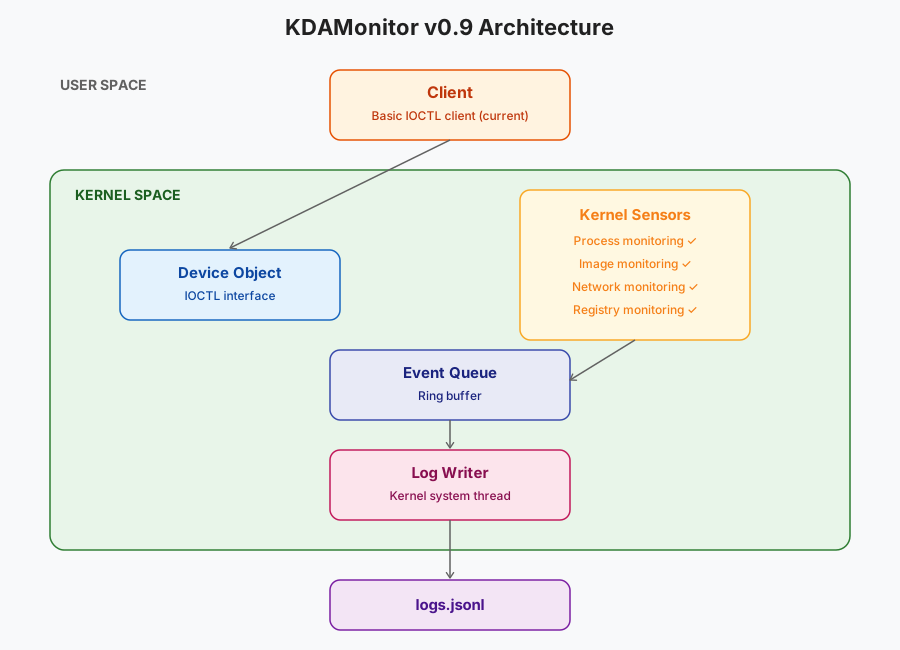
The second-to-last sensor is done! KDAMonitor now logs processes, image loads, network connections, and registry activity. We’re getting closer to the end of this project bit by bit…
Here’s the updated architecture:
Thanks for reading all the way through, and see you in the next and tenth article of this series: Monitoring Thread Creation and Termination.