
Welcome to the fifth article in the KDAMonitor development series!
In this article, I’ll cover version v0.5 of the project. In this version, I implement the first of the project’s 5 sensors/callbacks: the process sensor.
Here are the files involved in this article, and the section that explains each one:
| File | Role | Section |
|---|---|---|
event_types.h | New KDAMON_PROCESS_EVENT_DATA type + union in KDAMON_EVENT | What to capture on process creation or termination? |
process_callback.h | Register/unregister declarations | Implementing the callback |
process_callback.c | The callback itself + creation/termination logic | Implementing the callback |
log_writer.c | JSONL serialization specific to process events | Serializing process events to JSONL |
driver_entry.c | Registering/unregistering the callback on load/unload | Wiring it into driver_entry.c |
The project can be found in this repository: KDAMonitor.
What to capture on process creation or termination?#
As explained in article 04, the driver uses a generic structure for events, with a union that provides the information specific to each event type. Each event’s structure lives in event_types.h and follows this shape:
typedef struct _KDAMON_<TYPE_OF_EVENT>_EVENT_DATA
{
  // The event's data
} KDAMON_<TYPE_OF_EVENT>_EVENT_DATA;
What’s actually worth capturing about a process event?
I chose to keep four pieces of information:
- the process ID (
ProcessId): aHANDLEfor the process being created or terminated - the parent process ID (
ParentProcessId): aHANDLEfor the process that created or terminated the current one - the process image name (
ImageFileName): a string (ofWCHAR) containing the full image name of the current process - the process status (
IsCreate): aBOOLEANtelling whether the process is being created (TRUE) or terminated (FALSE)
These four fields are enough to describe and distinguish a process.
Here’s the resulting structure representing a process event in the driver:
typedef struct _KDAMON_PROCESS_EVENT_DATA
{
	HANDLE ProcessId;
	HANDLE ParentProcessId;
	BOOLEAN IsCreate;
	WCHAR ImageFileName[260];
} KDAMON_PROCESS_EVENT_DATA;
The magic number
260corresponds to Windows’ maximum path length, and will be turned into a proper macro in a later version :)
What is a callback?#
In article 2, I implemented the client and its communication with the driver. Here, though, what we’re after is different: we want the driver to automatically detect certain events on its own — in this case, process creation and termination.
To do this, the Windows kernel provides callbacks. The principle is simple: you give the kernel a pointer to a function, asking it to run that function automatically whenever a certain condition occurs.
For process creation/termination, the dedicated function is PsSetCreateProcessNotifyRoutineEx, which will be covered in detail in the next section.
Implementing the callback#
This section covers the driver’s callback implementation, entirely contained in process_callback.c. There are three functions in this file, two of which are exposed in the header. Let’s start with those two:
NTSTATUS KdaMonProcessCallbackRegister(VOID);: the function called fromdriver_entry.cto register the callbackVOID KdaMonProcessCallbackUnregister(VOID);: the function called fromdriver_entry.cto unregister the callback
And the private function invoked whenever a process is created or terminated:
static VOID KdaMonProcessNotifyRoutine(
    _Inout_ PEPROCESS Process,
    _In_ HANDLE ProcessId,
    _Inout_opt_ PPS_CREATE_NOTIFY_INFO CreateInfo
);
This function’s signature follows this shape:
PCREATE_PROCESS_NOTIFY_ROUTINE_EX PcreateProcessNotifyRoutineEx;

VOID PcreateProcessNotifyRoutineEx(
  [_Inout_]           PEPROCESS Process,
  [in]                HANDLE ProcessId,
  [in, out, optional] PPS_CREATE_NOTIFY_INFO CreateInfo
)
{...}
See the Microsoft documentation for PCREATE_PROCESS_NOTIFY_ROUTINE_EX, the routine type used by PsSetCreateProcessNotifyRoutineEx
The notification routine#
First, we need to define the routine called on process creation and termination. Its signature gives us three pieces of information:
PEPROCESS Process: a pointer to the structure representing the processHANDLE ProcessId: the process IDPPS_CREATE_NOTIFY_INFO CreateInfo: a pointer to the PS_CREATE_NOTIFY_INFO structure, which gives information about the process
CreateInfois only populated when the process is created: on termination, this pointer is simplyNULL.
At the start of this routine, we need to build the event of type KdaMonEventProcess:
KDAMON_EVENT Event = { 0 };
Event.Type = KdaMonEventProcess;
KeQuerySystemTimePrecise(&Event.Timestamp);

// ProcessId is already given in the function signature!
Event.Data.Process.ProcessId = ProcessId;
We then need to distinguish two cases: process creation and process termination.
Process creation#
On process creation, we can fill in the entire event structure (KDAMON_EVENT Event). We just need to pull the available information from the structures passed as arguments:
if (CreateInfo) {
  // --- Process creation case ---
  Event.Data.Process.ParentProcessId = CreateInfo->ParentProcessId;
  Event.Data.Process.IsCreate = TRUE;

  PCUNICODE_STRING ImageFileName = CreateInfo->ImageFileName;

  if (ImageFileName && ImageFileName->Buffer != NULL) {
    SIZE_T MaxCopyLength = sizeof(Event.Data.Process.ImageFileName) - sizeof(WCHAR);
    SIZE_T ImageFileNameLength = (ImageFileName->Length < MaxCopyLength) ? ImageFileName->Length : MaxCopyLength;
    RtlCopyMemory(Event.Data.Process.ImageFileName, ImageFileName->Buffer, ImageFileNameLength);
    Event.Data.Process.ImageFileName[ImageFileNameLength / sizeof(WCHAR)] = L'\0';
  }
}
Process termination#
On process termination, the only thing we can get is the ProcessId, so IsCreate is set to FALSE. In code:
    else {
		// --- Process termination case ---
		Event.Data.Process.ParentProcessId = NULL;
		Event.Data.Process.IsCreate = FALSE;
		Event.Data.Process.ImageFileName[0] = L'\0';
    }
In both cases, once the Event structure is filled in, it’s pushed to the queue with KdaMonEventQueuePush(&Event);.
Full code for KdaMonProcessNotifyRoutine#
static VOID KdaMonProcessNotifyRoutine(_Inout_ PEPROCESS Process, _In_ HANDLE ProcessId, _Inout_opt_ PPS_CREATE_NOTIFY_INFO CreateInfo)
{
	UNREFERENCED_PARAMETER(Process);

	KDAMON_EVENT Event = { 0 };
	Event.Type = KdaMonEventProcess;
	KeQuerySystemTimePrecise(&Event.Timestamp);

	Event.Data.Process.ProcessId = ProcessId;

    if (CreateInfo) {
		// --- Process creation case ---
		Event.Data.Process.ParentProcessId = CreateInfo->ParentProcessId;
		Event.Data.Process.IsCreate = TRUE;

		PCUNICODE_STRING ImageFileName = CreateInfo->ImageFileName;

		if (ImageFileName && ImageFileName->Buffer != NULL) {
			SIZE_T MaxCopyLength = sizeof(Event.Data.Process.ImageFileName) - sizeof(WCHAR);
			SIZE_T ImageFileNameLength = (ImageFileName->Length < MaxCopyLength) ? ImageFileName->Length : MaxCopyLength;
			RtlCopyMemory(Event.Data.Process.ImageFileName, ImageFileName->Buffer, ImageFileNameLength);
			Event.Data.Process.ImageFileName[ImageFileNameLength / sizeof(WCHAR)] = L'\0';
		}
    }
    else {
		// --- Process termination case ---
		Event.Data.Process.ParentProcessId = NULL;
		Event.Data.Process.IsCreate = FALSE;
		Event.Data.Process.ImageFileName[0] = L'\0';
    }
	KdaMonEventQueuePush(&Event);
}
Registering and unregistering the callback#
As explained in What is a callback?, PsSetCreateProcessNotifyRoutineEx is used both to register and to unregister the callback (the Remove parameter simply flips the direction of the call):
NTSTATUS KdaMonProcessCallbackRegister(VOID)
{
	NTSTATUS status = PsSetCreateProcessNotifyRoutineEx(KdaMonProcessNotifyRoutine, FALSE);
	if (!NT_SUCCESS(status))
	{
		KdPrint((DRIVER_TAG "[ERROR] PsSetCreateProcessNotifyRoutineEx failed: 0x%08X\n", status));
	}
    return status;
}

VOID KdaMonProcessCallbackUnregister(VOID)
{
    NTSTATUS status = PsSetCreateProcessNotifyRoutineEx(KdaMonProcessNotifyRoutine, TRUE);
    if (!NT_SUCCESS(status))
    {
		KdPrint((DRIVER_TAG "[ERROR] PsSetCreateProcessNotifyRoutineEx failed: 0x%08X\n", status));
    }
}
Serializing process events to JSONL#
As explained in article 04, each event type has its own JSONL serialization function. Here’s the one for process events:
static NTSTATUS KdaMonLogWriterWriteProcessEvent(_In_ const KDAMON_EVENT* Event, _Out_writes_z_(BufferSize) PSTR EventBuffer, _In_ SIZE_T BufferSize)
{
    CHAR EscapedImage[520];
    CHAR PpidField[16];

    if (!KdaMonJsonEscapeW(Event->Data.Process.ImageFileName, EscapedImage, sizeof(EscapedImage)))
    {
        KdPrint((DRIVER_TAG " [WARNING]: Image path truncated during JSON escape (event %lu)\n", Event->Id));
    }

    if (Event->Data.Process.IsCreate && Event->Data.Process.ParentProcessId != NULL)
    {
        RtlStringCbPrintfA(PpidField, sizeof(PpidField), "%lu",
            (ULONG)(ULONG_PTR)Event->Data.Process.ParentProcessId);
    }
    else
    {
        RtlStringCbCopyA(PpidField, sizeof(PpidField), "null");
    }

    return RtlStringCbPrintfA(
        EventBuffer,
        BufferSize,
        "{\"id\":%lu,\"type\":\"%s\",\"timestamp\":%lld,"
        "\"pid\":%lu,\"ppid\":%s,\"is_create\":%s,\"image\":\"%s\"}\n",
        Event->Id,
        KdaMonEventTypeToString(Event->Type),
        Event->Timestamp.QuadPart,
        (ULONG)(ULONG_PTR)Event->Data.Process.ProcessId,
        PpidField,
        Event->Data.Process.IsCreate ? "true" : "false",
        EscapedImage
    );
}
Here’s what this function does, step by step:
- It escapes special characters using the
KdaMonJsonEscapeWfunction
This function won’t be covered in detail here for the sake of simplicity. It can, however, be found in the log_writer.c source file.
- It writes the
ParentProcessIdinto thePpidFieldarray (Parent Process Id Field) if it exists, ornullotherwise. - It fills the
EventBufferbuffer with the information gathered from the event.
A process event line looks like this:
{"id":42,"type":"process","timestamp":134025123456789012,"pid":1234,"ppid":856,"is_create":true,"image":"C:\\Windows\\System32\\notepad.exe"}Wiring it into driver_entry.c#
First, the callback needs to be registered in DriverEntry, and unregistered in DriverUnload:
void DriverUnload(_In_ PDRIVER_OBJECT DriverObject)
{
	UNREFERENCED_PARAMETER(DriverObject);

	KdaMonProcessCallbackUnregister(); // Unregister the callback
	KdaMonLogWriterStop();
	KdaMonEventQueueDestroy();
	KdaMonDeleteDevice(g_DeviceObject);
	KdPrint((DRIVER_TAG " [SUCCESS]: Driver Unload called\n"));
}

NTSTATUS DriverEntry(_In_ PDRIVER_OBJECT DriverObject, _In_ PUNICODE_STRING RegistryPath)
{
	UNREFERENCED_PARAMETER(RegistryPath);

	DriverObject->DriverUnload = DriverUnload;
	DriverObject->MajorFunction[IRP_MJ_CREATE] = KdaMonCreateClose;
	DriverObject->MajorFunction[IRP_MJ_CLOSE] = KdaMonCreateClose;
	DriverObject->MajorFunction[IRP_MJ_DEVICE_CONTROL] = KdaMonDeviceControl;

	NTSTATUS status = KdaMonCreateDevice(DriverObject, &g_DeviceObject);
	if (!NT_SUCCESS(status))
	{
		return status;
	}

	// --- Initialize the event queue ---
	if (!KdaMonEventQueueInitialize())
	{
		KdPrint((DRIVER_TAG " [ERROR]: EventQueueInitialize failed\n"));
		return STATUS_UNSUCCESSFUL;
	}

	// --- Start the log writer thread ---
	if (!KdaMonLogWriterStart(DriverObject))
	{
		KdPrint((DRIVER_TAG " [ERROR]: KdaMonLogWriterStart failed\n"));
		return STATUS_UNSUCCESSFUL;
	}

	// --- Register process creation callback ---
	if (!NT_SUCCESS(KdaMonProcessCallbackRegister()))
	{
		KdPrint((DRIVER_TAG " [ERROR]: KdaMonProcessCallbackRegister failed\n"));
		return STATUS_UNSUCCESSFUL;
	}

	KdPrint((DRIVER_TAG " [SUCCESS]: Initialized successfully\n"));
	return STATUS_SUCCESS;
}
For this version, the validation test is to create a process and check that an event is properly created and written to the log file with the right type. So right after starting the driver, I open Notepad, then stop the driver once Notepad is open. To do this, I wrote the following script (test_v05.ps1):
# test_v05.ps1

$Driver = "KDAMonitor"
$DriverPath = "$env:USERPROFILE\Desktop\$Driver.sys"

sc.exe stop $Driver
sc.exe delete $Driver

sc.exe create $Driver type= kernel binPath= $DriverPath
sc.exe start $Driver

Start-Process notepad.exe -Wait

sc.exe stop $Driver
sc.exe delete $Driver
Here’s a demonstration of this test running:
Conclusion#
The first sensor is now implemented. This version also confirmed that the previous building blocks (the event queue and the jsonl logging) work as intended.
For this release (v0.5), I also added an architecture diagram of the current project to the README.md:
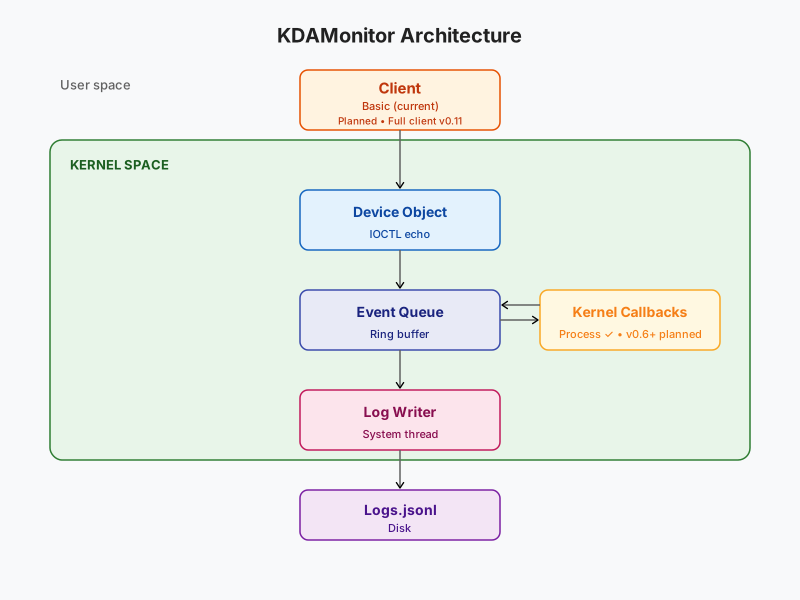
The next versions (up to v0.10) will focus on implementing new callbacks and callouts, so I’ll spend less time explaining event serialization to jsonl going forward.
Thanks for reading all the way through, and see you in the next article — the sixth in this series: Second Sensor: Tracking Image and DLL Loading.